
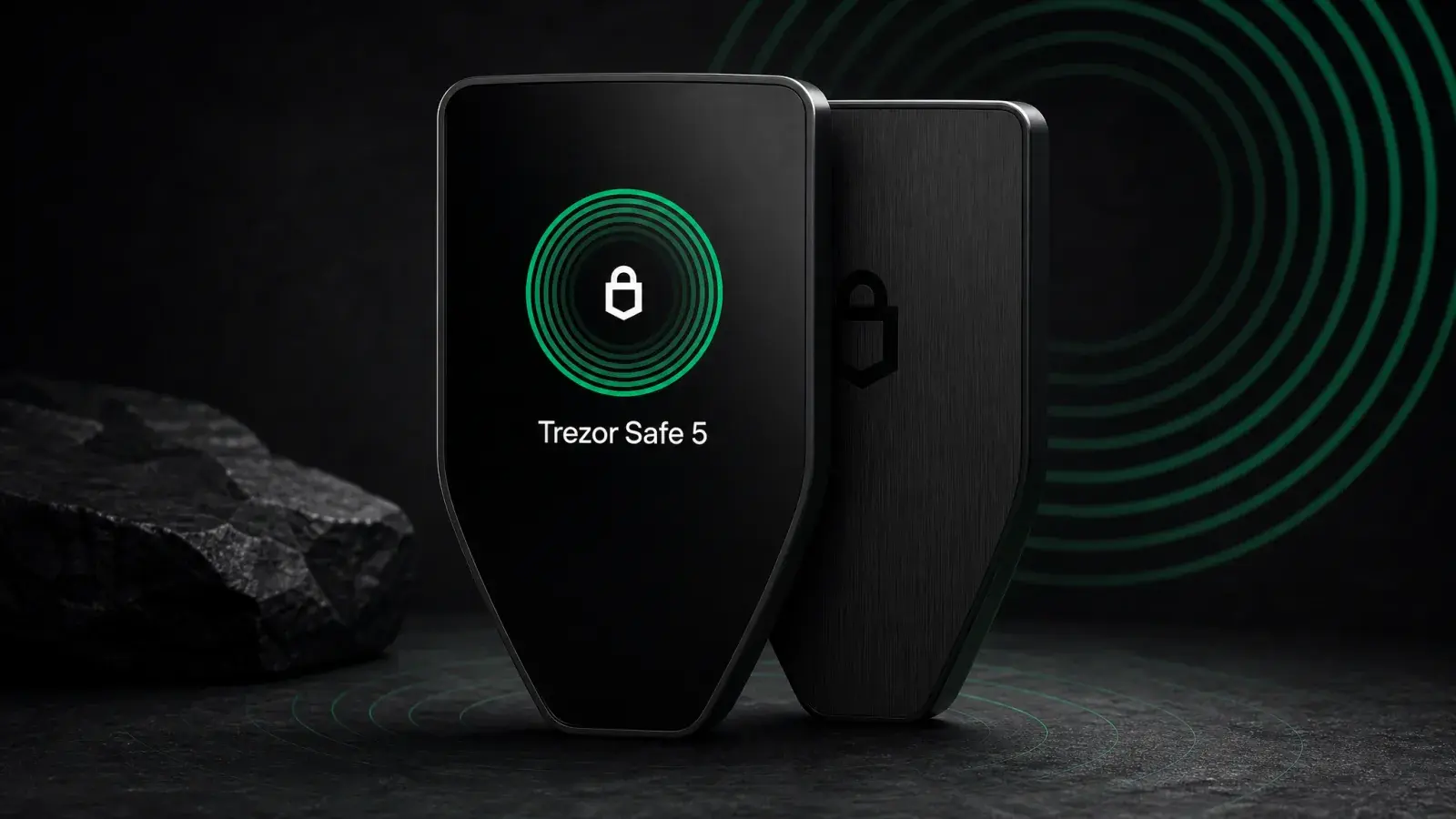
Bottom line: Trezor Safe 5 is the default Trezor recommendation for anyone who will use a hardware wallet regularly. It protects keys with an NDA-free EAL6+ Secure Element, keeps Trezor’s firmware and hardware design open, and makes transaction checks much easier with a colour touchscreen and haptic confirmation. Safe 3 offers the same basic custody philosophy for US$90 less, while Safe 7 adds iPhone-friendly wireless use for US$80 more. If USB-C fits your workflow, Safe 5 is the sensible middle.
Safe 5 gives a short vibration when the wallet asks for final confirmation. The detail sounds minor, but it makes signing feel deliberate. Combined with a 1.54-inch colour display, it fixes much of the friction that causes owners of tiny two-button wallets to click through details they should be reading.
Trezor released Safe 5 on June 14, 2024 at US$169. It now sits between the US$79 Safe 3 and wireless US$249 Safe 7. Safe 5 is not the newest or cheapest. It is the model where Trezor’s open-source security approach and a comfortable interface meet without adding a battery or radio.
Review methodology: Boxmining assessed the current shipping specifications, Trezor Suite, official security and compatibility documentation, and the wallet’s position in the complete 2026 Trezor range. We are not claiming a fresh long-term durability or penetration test. Price and support were checked on August 10, 2026.
Trezor Safe 5 specifications
| Feature | Trezor Safe 5 |
|---|---|
| List price | US$169 |
| Display | 1.54-inch colour touchscreen, 240 × 240 pixels |
| Feedback | Haptic motor |
| Cover glass | Gorilla Glass 3 |
| Security | NDA-free OPTIGA Trust M Secure Element, CC EAL6+ |
| Connectivity | USB-C only |
| Battery | None; powered over USB |
| Size | 65.9 × 40 × 8 mm |
| Weight | 23 g |
| Materials | Plastic body, anodized aluminium back |
| Backup support | 12-, 20- or 24-word backup; Advanced Multi-share Backup |
| Expansion | microSD card slot |
The current hardware details come from Trezor’s Safe 5 product page. Standard and Bitcoin-only editions share the same hardware, and firmware can be changed later.
The touchscreen is a security feature
A hardware wallet cannot know what you meant to do. It only knows what a computer or phone asked it to sign. The trusted display is where the proposed address, amount, fee and contract action can be compared with the owner’s intent.
Safe 5’s 240 × 240 panel is still small beside Safe 7 or a Ledger touchscreen, but it is dramatically easier to use than Safe 3’s 128 × 64 OLED. PIN entry, recovery checks and long transaction details require less mechanical scrolling. Colour can separate prompts and warnings. Haptics add a distinct physical confirmation to critical steps.
None of this rescues a user who does not read. Smart-contract data can still be difficult to interpret, especially through a third-party wallet. If the screen shows an unfamiliar approval, unlimited allowance or destination, cancel first. A pleasant interface should create more scrutiny, not faster tapping.
Gorilla Glass 3 improves scratch resistance, while the anodized aluminium back makes the 23 g device feel less disposable than its weight suggests. The glass can still crack. A failed display does not destroy the assets; the recovery backup restores them on another compatible wallet.
Open source plus a Secure Element
Trezor built its reputation on firmware and hardware designs that researchers can inspect. The Safe generation adds a hardened chip without abandoning that principle. Safe 5 uses an NDA-free OPTIGA Trust M Secure Element certified to CC EAL6+ alongside the main microcontroller.
The Secure Element helps protect the authentication secret and enforce PIN attempts if a thief has physical possession. The main processor runs Trezor’s open firmware and handles the interface. Official firmware is signed, and the device warns when unapproved firmware is loaded.
This layered approach addresses a weakness of older Trezor models, where specialist physical extraction attacks made a strong passphrase especially important. It does not turn Safe 5 into a magic black box. Supply-chain attacks, malicious software, coercion and recovery-phrase phishing remain possible. Certifications describe tested resistance under a defined process; they are not lifetime guarantees.
Trezor’s transparency is the main reason to choose Safe 5 over a Ledger at a similar price. Ledger’s Secure Element stack and important OS layers remain proprietary. Ledger counters with deeper commercial integrations and stronger iPhone support. Buyers are deciding which trust model and workflow they can maintain, not choosing between “secure” and “insecure.”
No battery or wireless connection
Safe 5 only works when connected through USB-C. There is no Bluetooth, NFC or rechargeable battery.
For cold storage, this is appealing. The device can sit untouched for years without a lithium cell aging, swelling or arriving empty. The absence of wireless interfaces reduces the amount of connectivity code an owner must trust. A direct cable also makes the physical state obvious: unplugged means unpowered.
For mobile use, it is restrictive. Android phones can connect over USB-C and use Trezor Suite with supported workflows. iPhones cannot use Safe 5 for setup, device management, signing or sending. The iOS app is limited to portfolio viewing and functions such as receiving or buying that do not require the cable-connected signer.
If iPhone is your primary computer, Safe 7 or a Bluetooth-capable Ledger is a better choice. Do not assume a USB-C connector on a recent iPhone creates compatibility; the software and accessory path still matter.
Recovery: 20 words and multi-share options
Safe 5 supports familiar 12- and 24-word backups plus Trezor’s 20-word SLIP39 system. During setup, users can create a single backup or an Advanced Multi-share Backup with a threshold.
A multi-share plan can remove a dangerous single point of failure. In a 2-of-3 arrangement, any two shares restore the wallet. A burglar finding one learns too little; a fire destroying one does not erase access. The benefit only exists when the shares occupy genuinely independent locations.
Do not build a complicated recovery plan to feel sophisticated. You, or the person handling your estate, must understand it under stress. Record the threshold, test a restoration with a small balance and periodically confirm that the required locations still exist.
Safe 5 also supports passphrase-protected hidden wallets. The passphrase is not a normal password that can be reset. Every spelling creates a different wallet, including an empty one. It can defend against recovery-share exposure, but forgotten characters permanently separate the owner from the funds.
The microSD slot can support device features such as encrypted PIN protection workflows; it does not turn the card into a standard recovery backup. Losing the card must not mean losing the wallet.
Trezor Suite and asset support
Trezor Suite is one of the cleaner manufacturer interfaces. It handles firmware, accounts, sends and receives, and includes Bitcoin features such as coin control and Tor routing. Integrated buy, sell and exchange options are supplied by third parties. Their spreads, fees, account checks and regional availability sit outside Trezor’s self-custody guarantees.
Trezor says Safe 5 supports thousands of coins and tokens. Some work directly inside Suite; others use third-party wallets such as MetaMask, Rabby or Electrum with Safe 5 providing signatures. The official coin directory is the place to check a specific asset.
Asset support needs a precise question. “Ethereum supported” does not automatically mean every L2, NFT view, staking method and contract interaction appears natively in Suite. Verify:
- The network and account type are supported by Safe 5 firmware.
- The desktop, Android or third-party wallet supports the device.
- The exact action you need can be represented and verified clearly.
Trezor’s Bitcoin-only firmware removes other networks and their code from the device interface. That smaller scope appeals to Bitcoin-focused users, but it does not strengthen a weak recovery plan or make careless signatures safe.
Safe 5 vs Safe 3: what does US$90 buy?
Both devices use a current Trezor security architecture with an NDA-free EAL6+ Secure Element, USB-C, open-source firmware and advanced backup support. Safe 5’s premium buys interaction quality:
- A 1.54-inch 240 × 240 colour touchscreen instead of a 0.96-inch monochrome OLED.
- Haptic confirmation instead of two physical buttons.
- Gorilla Glass 3 and a larger body.
- A microSD slot.
For a wallet opened a few times a year, Safe 3 is the better value. For weekly use or complex transactions, Safe 5 makes the security ritual substantially less irritating. Reducing friction is worthwhile when it results in more careful verification.
Safe 5 vs Safe 7: is wireless worth US$80?
Safe 7 adds a 2.5-inch 520 × 380 display, Bluetooth, Qi2 charging, an IP54 rating, a replaceable-design LiFePO4 battery and a three-chip architecture. It signs from iPhone, which Safe 5 cannot do. That is the decisive upgrade for a mobile-first buyer.
The newer TROPIC01 Secure Element in Safe 7 also has a disclosed laser fault-injection flaw. Ledger Donjon demonstrated arbitrary firmware execution on that chip in June 2026. Trezor says its dual-Secure-Element architecture keeps funds, PINs and backups safe because TROPIC01 alone does not contain sufficient secrets. No user action is required, but the flaw cannot be fully patched in existing hardware.
Safe 5 uses the older, mature OPTIGA-based design and has no radio or battery. A buyer does not need to pay more merely to own the newest model. Pay more when the larger display and complete phone support solve a real workflow problem.
Safe 5 vs Ledger Nano Gen5 and Flex
Nano Gen5 costs US$179, almost the same as Safe 5, and adds Bluetooth, NFC and a larger 2.8-inch E Ink touchscreen. Ledger Flex at US$249 adds stronger materials and a sharper E Ink panel. Ledger’s direct and third-party asset ecosystem is broader, particularly for iPhone and multi-chain use.
Safe 5 answers with open-source firmware and hardware designs, no battery, no wireless radios and Trezor’s flexible backup system. The colour display is smaller than Ledger’s E Ink panels but quicker and supported by haptics.
Choose Ledger if mobile convenience and ecosystem breadth dominate. Choose Safe 5 if inspectability, cable-only operation and a clean cold-storage workflow dominate.
Who should buy Trezor Safe 5?
Buy Safe 5 if:
- You want Trezor’s open-source approach with a modern touchscreen.
- You sign often enough to resent Safe 3’s buttons and tiny display.
- Desktop or Android is your normal transaction environment.
- A battery-free, USB-only device matches your threat model.
Skip Safe 5 if:
- iPhone is your only or primary computer.
- The wallet will almost never send; Safe 3 is enough.
- You need the widest possible native altcoin and mobile integrations.
- You want the largest screen regardless of cost.
Verdict
Trezor Safe 5 is not the specification winner. That helps it remain the practical winner.
It avoids Safe 7’s battery, wireless stack and newer-chip controversy while fixing the interface weakness of Safe 3. The touchscreen and haptics make security prompts easier to process; the open design and certified Secure Element create a defensible physical-security model; USB-C keeps operation simple.
The iPhone limitation is severe and should be printed more loudly on the buying page. For desktop and Android users, however, Safe 5 is the Trezor most people should buy in 2026. It spends its premium where it changes behavior: at the moment a transaction is read and approved.
Frequently asked questions
Does Trezor Safe 5 work with iPhone?
Not for full device operation. Trezor Suite on iOS can show a portfolio and support limited non-signing functions, but Safe 5 cannot currently perform setup, device management, sending or signing on an iPhone. Use a supported desktop or Android device.
Is Safe 5 more secure than Safe 3?
Their basic security architecture is similar. Safe 5’s larger touchscreen and haptic feedback can improve human verification, while Gorilla Glass adds physical durability. Safe 3 provides comparable core key protection at a lower price.
Does Safe 5 need charging?
No. It has no battery and is powered through USB-C. This is useful for long storage but prevents wireless or disconnected operation.
How many cryptocurrencies does Safe 5 support?
Trezor describes support for thousands of coins and tokens, with some managed directly in Suite and others through compatible third-party wallets. Check the official coin directory for the exact network and feature instead of relying on a single headline number.
Share
Found this useful?
Share it with someone who'd want to read it.
Related
Trezor Safe 3 Review (2026): The Best US$79 Cold Wallet?
Trezor Safe 3 offers open-source cold storage and an EAL6+ Secure Element for US$79. Best for holders who accept a tiny screen and no iPhone support.
Trezor Safe 7 Review (2026): Is Wireless Worth US$249?
Trezor Safe 7 adds Bluetooth, wireless charging and a larger screen for US$249. It suits mobile users who understand the TROPIC01 disclosure.
Ledger Stax Review (2026): Is the $399 Wallet Worth It?
Ledger Stax offers a curved E Ink screen and Qi charging for US$399, but not stronger key protection. It suits design-first buyers, not value seekers.